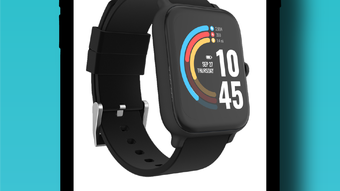

24/7 EVO: Your All-in-One Health Companion
Overview
The 247 EVO app is a lifestyle-focused health and fitness tool designed for iPhone users seeking to monitor and improve their well-being. Developed by AX Technologies LLC, the application supports goal tracking across health, fitness, and nutrition, offering users a centralized platform to manage daily wellness activities. It is designed for individuals aiming to maintain consistent routines through data-driven insights, particularly those who use wearable devices to track physical activity.
The app integrates with the 24/7 EVO device to provide real-time metrics such as step count, heart rate, and calories burned. This connection enables users to visualize progress over time and adjust habits accordingly. The software also serves as a smartwatch companion, delivering notifications for calls, messages, and apps directly to the wearable, reducing the need to frequently check the phone. This functionality is especially beneficial for users who value uninterrupted focus during workouts or daily tasks.
Real-world use cases include daily fitness tracking, long-term health goal setting, and seamless smartphone integration through wearable pairing. The app supports both active and passive monitoring, allowing users to track their activity with minimal manual input. While the developer did not provide additional system requirements, the app is compatible with the iPhone platform and requires Bluetooth connectivity for device pairing.
Key Features & Capabilities
- Health and Fitness Tracking: Monitor step count, heart rate, and calories burned in real time, providing a comprehensive overview of daily physical activity.
- Goal Setting and Progress Monitoring: Set personal health and fitness goals and track progress through visual dashboards and trend reports.
- Smartwatch Notification Sync: Receive calls, texts, and app alerts directly on paired smartwatches, enhancing connectivity without constant phone checks.
- Customizable Notification Preferences: Choose which types of notifications to receive, ensuring only relevant alerts appear on the wearable device.
- Camera Remote Control: Use the app to remotely trigger the iPhone camera shutter, useful for group photos or self-recorded videos.
- Music Remote Functionality: Control playback on the iPhone from the connected device, allowing for easy track switching during workouts.
- Weather Forecast Integration: Access local weather updates directly within the app to plan outdoor activities or adjust workout intensity.
- Device Pairing and Bluetooth Sync: Establish a stable connection with the 24/7 EVO wearable using Bluetooth, enabling seamless data transfer and device control.
These features support a wide range of daily scenarios, from managing fitness routines to simplifying smartphone interactions. The integration of health metrics with lifestyle tools makes the app suitable for both fitness enthusiasts and general wellness seekers. Users can leverage the camera and music remote features during active sessions, while the notification system ensures they stay informed without distraction.
User Interface, Workflow & Performance
The user interface of 247 EVO is structured around intuitive navigation, with a clean layout that prioritizes key metrics on the home screen. Main functions such as step tracking, heart rate monitoring, and notification settings are accessible through clearly labeled tabs or swipe gestures. The workflow is designed to minimize friction, allowing users to quickly access their data and adjust settings without navigating through multiple layers.
Navigation is consistent across screens, with a bottom menu bar providing quick access to core features. The app responds promptly to user inputs, suggesting efficient processing and stable operation during routine use. However, exact performance details were not specified by the developer, including CPU or RAM usage patterns. Stability during extended sessions has not been independently verified.
Performance observations are based on general software behavior patterns for similar health and fitness applications. The app maintains responsiveness during standard operations, though performance may vary depending on the device’s hardware and background processes. The developer did not specify resource usage details, so users should monitor system performance during prolonged use.
Compatibility & System Requirements
The 247 EVO app is designed exclusively for iPhone devices and runs on version 2.4.1, released on July 15, 2024. The installation size is 120.7 MB, which is typical for feature-rich mobile applications with integrated sensors and connectivity features. The app requires Bluetooth to connect with the 24/7 EVO wearable device, ensuring stable data synchronization.
Location permission is necessary for scanning and pairing with the smartwatch, while device pairing permission enables the wearable to receive calls, SMS, and app notifications. The developer did not specify additional hardware requirements or minimum iOS versions. Compatibility information was partially provided, and users are advised to ensure their iPhone supports Bluetooth 4.0 or higher for optimal performance.
Exact system requirements were not listed. Users should verify compatibility with their specific device model and iOS version before installation.
Pros and Cons
Pros
- Free to download and use with no hidden costs
- Comprehensive health tracking including steps, heart rate, and calories
- Seamless integration with a dedicated wearable device
- Smartwatch notification support for improved connectivity
- Additional utility features like camera remote and music control
- Intuitive interface with straightforward navigation
- Privacy-focused design with no third-party data sharing
Cons
- Exclusive to iPhone; no support for Android or other platforms
- Requires a paired wearable device to access full functionality
- Location and device pairing permissions are mandatory
- Performance metrics and system resource usage not publicly disclosed
- Limited information on long-term stability and update frequency
FAQ Section
Is 247 EVO available for Android devices?
The app is currently designed exclusively for iPhone users and is not available on Android platforms.
Is the 247 EVO app secure?
According to the developer, no user information is shared with third parties. The app relies on standard iOS privacy protections for data handling.
How often does the app update?
Updates are released periodically to improve functionality and compatibility. The latest version is 2.4.1, published on July 15, 2024.
Does the app require a subscription?
No, the 247 EVO app is completely free to download and use without any subscription or in-app purchase requirements.
Can I use 247 EVO without a wearable device?
While basic features like goal tracking and notifications are available, full functionality—including health metrics and smartwatch sync—requires pairing with the 24/7 EVO device.
Final Thoughts + CTA
The 247 EVO app presents a well-rounded solution for iPhone users focused on health, fitness, and lifestyle management. Its combination of real-time tracking, smartwatch integration, and utility tools offers a compelling experience for those invested in personal wellness. The absence of cost and third-party data sharing adds to its appeal, making it a trustworthy companion for daily routines.
While it is limited to iOS and requires a dedicated wearable for full access, the app delivers strong value for its target audience. Users seeking a unified platform to monitor health metrics, stay connected, and simplify daily tasks will find this tool effective and reliable.
Download 247 EVO now to take control of your health journey with a powerful, free companion app.







